Jujutsu is my new git
I recently wrote a post on what I love about Rust and it made me think about all the tools I have found over the years which have brought me a lot of joy. So, as a second installment, let me tell you how I discovered Jujutsu and why I don’t want to go back.
What is Jujutsu?
Jujutsu, generally abbreviated by its command line name “jj”, is a version control system (VCS) like git, mercurial or svn. As things currently stand, jj git as a although initial and long-term plans are to implement and use its own native backend. This means you can use jj on any git repository without any changes or implications for your co-contributors. I’ve been using jj on all my work repositories for a year now, and my colleagues don’t have to know or care about it. This is because when you use the git backend, jj does all the work of translating its own VCS model back and forth to the underlying git repo, acting as a transparent layer. In my opinion, this is one of the main reasons for jujutsu’s current popularity: VCS tools are subject to network effects (just like social media) as they are mostly useful when collaborating with others on the same codebase. So there is a lot of inertia to switch to a new VCS, even if it’s better. By being compatible with git repositories, jj allows you to try it out without any risk.
Okay but what’s so good about jj?
Before I can really explain what works so well about jj, let me summarize how git works. Let me preface that explanation by saying that I’m very far from a git expert, I know how to do what I need to do and that’s it. It’s actually one of the reasons I got so excited about jj: after years of using git, I still feel like I barely understand or control it, and I don’t think I’m the only one. Git has multiple layers:
- the working directory where all your files live (tracked and untracked),
- the index (or staging area) which is a snapshot of the tracked files in preparation of a commit,
- the repository which contains every commit (you can also think about them as saved snapshots of tracked files with a unique identifier),
- the remote repository (optional, if you use a git forge like Github, Codeberg or GitLab) is a remote endpoint acting as source of truth for your repository.
The usual git workflow is to edit files, use git add <file> on the changes you want to keep, then git commit to send the changes from the staging area to the repository in the form of a commit. To synchronize local and remote changes, you then use git pull and git push.
Git organizes your work in branches (pointers to specific commits), committing changes to them, merging them, rebasing changes within/across them, etc. When changes are not straightforward between two branches during a merge or a rebase, git flags these conflicts and makes you fix them all immediately before proceeding.
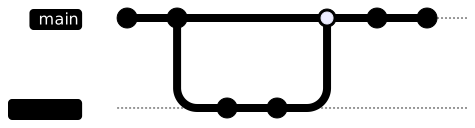
Jujutsu completely reverses the process and this leads to simpler workflows in my experience. In jj, there is no distinction between the working directory and the index layers: there is only a working directory. All files and changes are automatically part of a revision unless explicitly ignored. There is no need to manually select files or partial changes, add them and commit them. Instead, all the work you do is always part of a revision (a commit in git’s lingo). Of course, since one is mutable-first and the other immutable-first, there is no one-to-one map between git commits and jj revisions. Instead, a revision has a unique identifier (different from the git hash which is tied to the content) and the underlying git commit changes as new modifications are done.
This might not sound like a huge difference, but the implications of this way of viewing changes are far-reaching. All operations like editing, rebasing, squashing, etc., are made much simpler in a paradigm where modifying previous changes is not taboo and is actually a first class operation. In the next section, I will explain a bit more how jj changed my workflow for the better, but first let me enumerate a few more differences between jj and git:
- rebasing is seamless and automatic: you can move commits around, reorder them, and edit them. Changes are automatically rebased in a much more user-friendly way than with git.
- Conflicts are not blocking, you can deal with conflicts whenever you’d like (this isn’t something I care much about, I don’t like conflicts, so I tend to deal with them immediately anyway),
- no operation is final with jj: its operations log allows you to restore any previous state of your repository. This means you can just do
jj undoeven for a rebase, a merge or whatever else. - jj does not have a notion of branches, instead it has bookmarks, which are also pointers to specific revisions, but unlike branches they don’t move along with new changes.
- jj has a very powerful revision query DSL (called revsets) which is a great way to filter/select appropriate revisions.
How I use jujutsu
Okay so far the main difference between git and jj seems to be how “committed changes” (commits in git, revisions in jj) are handled. But as I hinted at above, this isn’t just a small backend change. In git, my workflow is typically:
- checkout a new branch from
main, - do stuff, maybe more than I was planning in one commit,
- add the relevant changes and commit,
- keep going until I’m done, then push the branch.
I don’t really tend to rebase or rewrite history a lot in git, mostly because it’s not very easy to do, and I like to push often. I’m sure for a lot of people it’s no big deal, but I find git’s rebasing process rather tedious. On the other hand, rebasing or changing history in jj is natural, you just need to edit a revision or move it and its descendants. jj takes care of most of the work for you, for example propagating conflict resolution. To me this is a game changer. I will often go back to an older revision, edit it quickly or split it in two. I might sprout a new revision between two existing ones, or just reorder some changes which I think make more sense that way. All of this is just so easy to do in jj that I find myself doing it all the time.
For most operations, everything that you can do in jj you can also do in git. In the above example, git allows rebasing too and git-rerere helps with caching conflict resolution. The point is rather how you do it. In my opinion, switching to jj is not about one tool being superior or not, but about whether it feels easier for you.
So, how does my workflow look like in jj by comparison? First, I don’t think in branches, but in changes.
- If I want to experiment with something quickly, I can just branch out a new change.
➜ jj@  l Some more changes○  m some changes HEAD◆  z root() 00000000
➜ jj new m -m "Some experiment"Working copy  (@) now at: zk 2a075167 (empty) Some experimentParent commit (@-)      : m 366a63d3 some changesAdded 0 files, modified 0 files, removed 1 files
➜ jj@ zk (empty) Some experiment│ ○ l Some more changes├─╯○ m some changes HEAD◆ zz root() 00000000- If I need to reorder changes, I can just rebase them easily.
➜ jj rebase -s l -d zkRebased 1 commits to destination
➜ jj○ l Some more changes@ zk (empty) Some experiment○ m some changes HEAD◆ zz root() 00000000- If I don’t like how I separated changes, I can split or squash changes even if they’re deep in the history.
➜ jj squash -f zk -t mRebased 1 descendant commitsWorking copy  (@) now at: y ec3b3257 (empty) (no description set)Parent commit (@-)      : m e79175bc Some experiment
➜ jj@ w (empty) (no description set)○ l Some more changes HEAD○ m Some experiment◆ z root() 00000000- Finally if I want to merge some changes together, I don’t need a separate explicit merge step. I can just create a new revision with two or more parents!
➜ jj@  y yet another change│ ○  l Some more changes├─╯○  m Some experiment HEAD◆  z root() 00000000
➜ jj new y l -m "merged changes"Working copy  (@) now at: s 6360cc9e (empty) merged changesParent commit (@-)      : y 0a2abd77 yet another changeParent commit (@-)      : l 356ef7b3 Some more changesAdded 1 files, modified 0 files, removed 0 files
➜ jj@    s (empty) merged changes├─╮│ ○  l Some more changes○ │  y yet another change HEAD├─╯○  m Some experiment◆  z root() 00000000
Using jj with Github
As I mentioned before, jj is completely compatible with git and currently relies on git in the backend. However, branches are a bit less natural, since they’re not part of jj’s model. Instead, jj uses bookmarks: functionally, they’re identical to branches (pointers to changes), but in practice, bookmarks are more like tags you can move. If you make new changes on a bookmark, you’re not growing a branch, you have to manually move the bookmark each time (there are configurations to make this easier, but bookmarks don’t move automatically by default). However, from the point of view of Github, the branches jj makes when you push bookmarks look just like regular branches. When you want to push some changes to a (possibly new) branch, you just need to place bookmarks where you want and push them to the remote.
If your colleagues made changes which you need to synchronize to your local repository, you can just use jj git fetch. Your tracked bookmarks will be automatically updated. At that point, the main operations I generally do are either:
- rebase local-only branches onto trunk if it has moved, using
jj r -s branch -d trunk(), - while if I have some other revisions already pushed to the remote, I might just merge the new changes using
jj new <bookmark-name> trunk().
Common commands
In this short section, I’d like to list some of the most useful jj commands I use on a daily basis and how they map to git commands. Note that this is not an exhaustive list, just the commands I use the most often. Also keep in mind that git bundles a lot of functionality inside git rebase -i while jj has more specialized commands for specific operations.
| jj command | git equivalent | Description |
|---|---|---|
jj new <parents> -m "msg" | git merge or git commit | Create a new revision with given parents |
jj desc -m "msg" | git commit --amend -m "msg" | Edit the message of the current revision |
jj edit <rev> | git rebase -i | Edit the content/message of a revision |
jj rebase -s <src> -d <dst> | git rebase | Rebase the source revision onto the destination revision |
jj squash -f <from> -t <to> | git rebase -i | Squash changes from a revision into another |
jj split | git rebase -i or git add -p | Split the current revision into multiple revisions |
jj bookmark create <name> | git branch <name> | Create a new bookmark (like a branch) at the current revision |
jj bookmark track <name> | git branch --set-upstream-to=origin/<name> <name> | Track a bookmark to a remote branch |
jj restore -f <rev> <path> | git checkout <rev> -- <path> | Restore a file from a specific revision |
jj git fetch | git fetch | Fetch changes from remote |
jj git push <bookmark> | git push | Push local bookmark to remote branch |
My configuration
Just like git, jj comes with batteries included, and you don’t really have to customize it if you don’t want to. However, there are some useful settings you can tweak to make your life easier, especially if you’re interacting with Github a lot. Below I’ve included my own configuration, with some comments explaining the choices I made. Note that I found most of it online in blog posts, some of which I still have a reference to and which you can find in the references section.
[ui]merge-editor = "vscode" # I use vscode as my merge editoreditor = "hx" # I use helix as my text editorpaginate = "never" # I don't use paginators for jj outputdefault-command = "log" # default command when running `jj` without args
[git]# Useful to avoid pushing WIP commitsprivate-commits = "description(glob:'WIP:*') | description(glob:'HACK:*') | description(glob:'TMP:*')"
[revset-aliases]# set all remote bookmarks (commits pushed to remote branches) to be immutable'immutable_heads()' = "builtin_immutable_heads() | remote_bookmarks()"
# Useful relative branch markers'closest_bookmark(to)' = 'heads(::to & bookmarks() & ~trunk())''closest_pushable(to)' = 'heads(::to & mutable() & ~description(exact:"") & (~empty() | merges()))'# Bookmarks markers'mybookmarks' = "mine() & bookmarks()"# All revisions from trunks to my bookmarks'mybranches' = "trunk() | (trunk()..mybookmarks) | mybookmarks | (mybookmarks.. & ~bookmarks())"
[revsets]# Default log revsets shown in `jj` command# Includes current changes, last 2 ancestors of immutable heads, trunk (main or master) and last 4 ancestors of local bookmarkslog = "present(@) | ancestors(immutable_heads().., 2) | present(trunk()) | ancestors(bookmarks(), 4)"
[aliases]# Great command to move the nearest bookmark to the closest pushable changetug = [    "bookmark",    "move",    "--from",    "closest_bookmark(@)",    "--to",    "closest_pushable(@)",]# New change on top of trunkfresh = ["new", "trunk()"]# Rebase current changes on top of trunk (useful after pull)rt = ["rebase", "-s", "@", "-d", "trunk()"]# Some shortcutse = ["edit"]r = ["rebase"]s = ["squash"]# Useful to quickly see changed files in a changesn = ["show", "--name-only"]# Log all ancestor revisionsla = ["log", "-r ::@"]# Log all current brancheswip = ["log", "-r mybranches"]
# Git interoperability commandsi = ["git", "init", "--colocate"]f = ["git", "fetch"]p = ["git", "push"]
Further reading
- Jujutsu for busy devs: part 1 and part 2.
- jj tips and tricks.
- Steve Klabnik’s jujutsu tutorial.